IntroductionNeuronal model building remains a challenge despite highly capable simulator platforms [1,2]. This is even more the case for multiscale models spanning molecular to electrophysiological detail, which are increasingly relevant for modeling plasticity, neuromodulation and long time-scale neuronal dynamics. Recent GUIs such as DendroTweaks have simplified electrophysiology modeling [3], but GUIs for multiscale models are scarce. JARDESIGNER is the Javascript App for Reaction-Diffusion and Electrical SIGnaling in NEuRons. It provides three things: a no-installation GUI for building and running models, a JSON file format for defining multiscale models, and a standalone Python library for building and running the models on the MOOSE simulator.
MethodsThe Jardesigner GUI is a client-server system. The GUI is implemented in Javascript in the REACT framework on the client browser, and the server backend is coded in Python. It uses the jardesigner Python library to build models running on the C++ codebase of MOOSE to efficiently perform the computations. There is a publicly hosted Jardesigner server at https://www.jardesigner.org/. The Jardesigner GUI does not use cookies or track users, and any files uploaded for model building are deleted as soon as the user quits a modeling session. The complete client-server package can be locally installed using pip install.
ResultsJardesigner enables rapid building of production multiscale neuronal simulations. Successive menu boxes specify morphology, spine distributions, passive and active properties, signaling pathways, and mappings between ephys and signaling entities (Fig. 1). Users load neuronal morphologies, channel mechanisms, and signaling kinetic specifications from standard databases and assemble them in the GUI. Additional menu boxes allow one to plot graphs, set up 3-D animations, and save simulation results. As the simulation is assembled, a 3-D view of the cell grows and provides icons for mechanisms and display elements. It is trivially easy to swap out one morphology for another, even as all the other components of the model are retained.
DiscussionJardesigner makes it easy to build and run complex, multiscale models entirely in the GUI, using predefined morphology, channel, and signaling building blocks. It is particularly well suited for teaching, and has been used effectively by students with no previous modeling experience. It is also in production use to build and test multiscale models for research simulations. Development directions include video tutorials and better integration with online databases. We encourage user feedback.
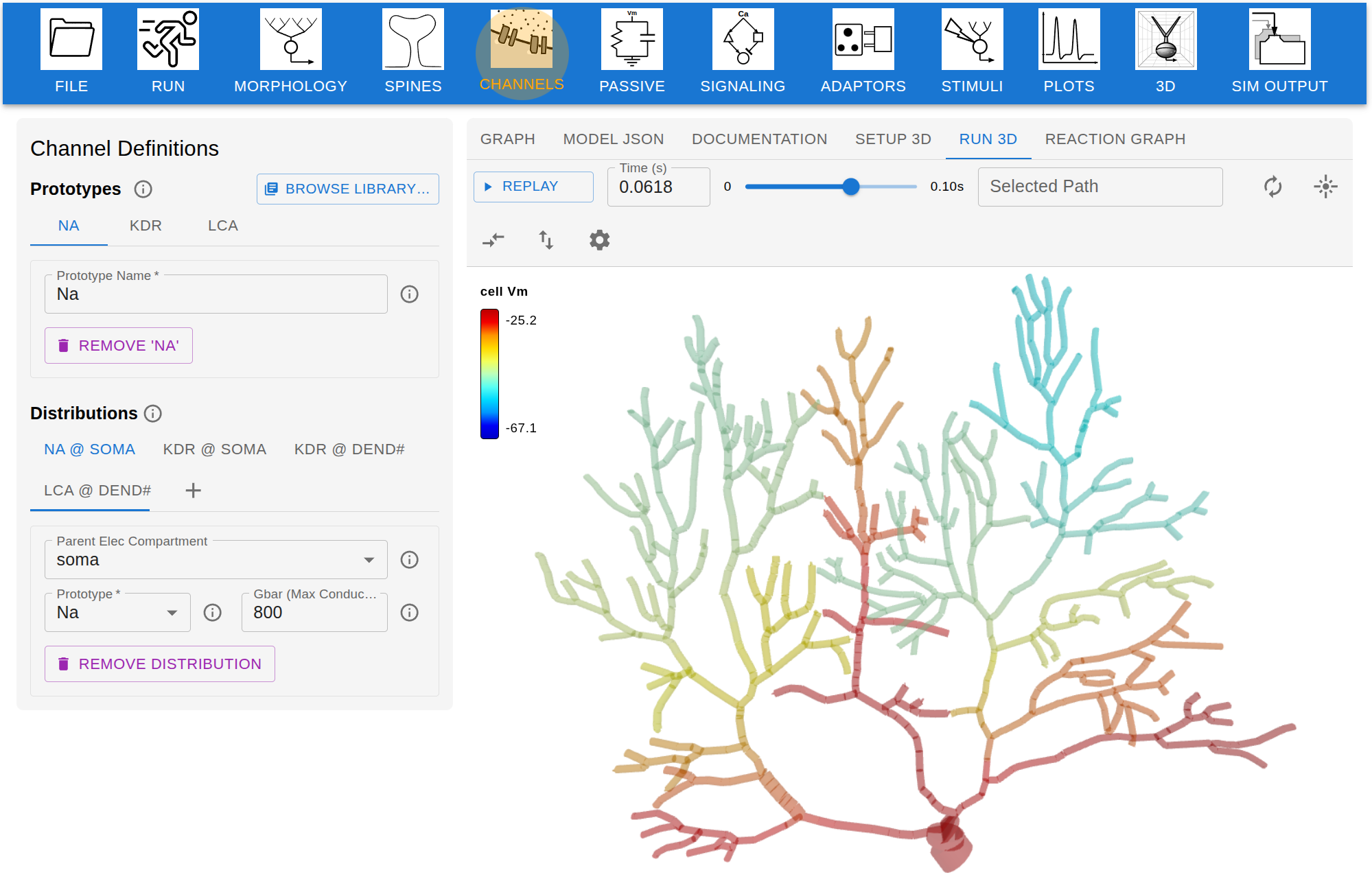 Figure 1. Screenshot of Jardesigner GUI. The menu options are in the blue bar above, and the Channel Menu box is open to the left. A snapshot of the current simulation is presented in the 3D display to the right.
References[1] Hines, M. (2009). NEURON and Python. Frontiers in Neuroinformatics, 3. doi: 10.3389/neuro.11.001.2009
[2] Ray, S., Bhalla, U.S. (2008). PyMOOSE: interoperable scripting in Python for MOOSE. Frontiers in Neuroinformatics, 2, 365 https://doi.org/10.3389/neuro.11.006.2008
[3] Makarov, R., Chavlis, S., Poirazi, P (2025). DendroTweaks, an interactive approach for unraveling dendritic dynamics. eLife, https://doi.org/10.7554/eLife.103324.3
AcknowledgementThe development of Jardesigner was supported by the Kavli Foundation through the EOSS Grant Cycle 6. USB receives research support from NCBS-TIFR through the Department of Atomic Energy, Government of India, under Project Identification No. RTI 4006. SR is supported by CHINTA and IAI under TCG CREST.